Apple iPad (11th Generation) - Activate eSIM | Vodafone Ireland
Apple iPad (11th Generation)

Apple iPad (11th Generation)

iPadOS 26

Activate eSIM in your Apple iPad (11th Generation) iPadOS 26

Read help info

An eSIM is a digital SIM that enables you to activate a price plan without the use of a physical SIM. To activate your eSIM, you need to establish a connection to a Wi-Fi network.

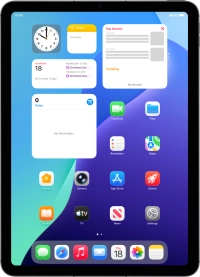
Press Settings.
Step 1 of 6

1. Find "Use QR Code"

Press Settings.

Press Mobile Data.
Step 2 of 6

1. Find "Use QR Code"

Press Mobile Data.

Press Use QR Code.
Step 3 of 6

1. Find "Use QR Code"

Press Use QR Code.

Press Scan QR code.
Step 4 of 6

1. Find "Use QR Code"

Press Scan QR code.

Place the QR code you've received inside the tablet camera frame to scan the code.
Step 5 of 6

2. Scan QR code

Place the QR code you've received inside the tablet camera frame to scan the code.

Apple iPad (11th Generation)
Step 6 of 6

3. Activate eSIM

Follow the instructions on the screen to finish the activation of your eSIM including keying in the activation code and setting up your eSIM as primary or secondary price plan.

1. Find "Use QR Code"

Press Settings.
Press Mobile Data.
Press Use QR Code.
Press Scan QR code.

2. Scan QR code

Place the QR code you've received inside the tablet camera frame to scan the code.

3. Activate eSIM

Follow the instructions on the screen to finish the activation of your eSIM including keying in the activation code and setting up your eSIM as primary or secondary price plan.
Apple iPad (11th Generation)

Get information on...

Or select...

Another device
4g accessories icon-app-store basket-change battery-life battery bill-pay-phones-icon 4C91DB73-75FE-4565-8F69-BC6C675B1EA1 bin block Brands broadband-icon broadband calendar call camera cases Chat chevron-down chevron-left chevron-right chevron-up close close collections€€ community continuous contract dashboard data download-square Download edit error-circle eye facebook filters folder go identity Less letters location Memory menu message mobile my-vodafone network_signal operating-system orders payg-phones-icon F86C85F6-FFFF-4C62-8F9A-45D7251FC836 payment photos play-store play plus rating report return roaming screen-size search secure-net shopping sim spinner squares technology tick-simple top-up top-up TV twitter value vf-tv-icon vodafone warning Weight world
Close dialog
Skip to content

Login to My Vodafone

Close dialog
Skip to content

Register with My Vodafone